
Shopify Product Page Optimization: Answer Buyer Questions
By Brave Banana
Published 10 min read
Shopify product page optimization is about more than attractive product photography and a well-designed Add to Cart button. Your product page should answer the questions that make customers hesitate before buying, without making them search through your website or contact your team for basic information.
Why should your product page answer customer questions?
A product page should help customers understand what they are buying and decide whether it suits their needs. When important information is missing, customers may contact your team, delay their decision or leave the website.
A product page, also called a product detail page, is the page that explains one product and helps a shopper decide whether to purchase it.
Think about someone visiting a skincare store for the first time. They find a product they like, but they still have questions. Is it suitable for their skin type? What ingredients does it contain? How much should they use? When will it arrive? What happens if the product does not suit them?
If the website does not answer these questions, the customer has to find the information elsewhere. They might send a WhatsApp message, open Instagram or simply leave without buying.
According to Nielsen Norman Group's UX guidelines for ecommerce product pages, customers rely on product pages because they cannot physically inspect, touch or try products before purchasing. Missing information can make shoppers abandon a purchase or buy something based on incorrect assumptions.
Your live chat should still be available. It should help with complex questions and personalised recommendations. The product page should handle the basic information customers need to make a buying decision.
What questions should a Shopify product page answer?
A Shopify product page should answer six main types of buying questions: suitability, product details, performance, quality, delivery and post-purchase risk. The exact questions depend on the product category and the customer.
Here is what customers commonly want to understand before buying.
Customer question | Information the product page should provide |
|---|---|
Is this product right for me? | Suitability, size, fit and compatibility |
What exactly am I buying? | Materials, ingredients, dimensions and quantity |
Does it work as described? | Product demonstrations, usage instructions and factual benefits |
Can I trust the product? | Genuine reviews, customer photos and product evidence |
When will it arrive? | Delivery estimates, shipping charges and PIN-code availability |
What if something goes wrong? | Return, exchange, refund and warranty information |
These questions are not just relevant to large brands. A small Shopify store needs to answer them too. The goal is not to add every possible detail to every product page. It is to identify the information that matters for the particular product being sold.
What product information should different D2C categories show?
Different product categories require different product-page information. A fashion customer needs help choosing a size, while someone buying electronics may need compatibility and technical specifications.
Use the questions customers actually ask in your category to decide what information belongs on the page.
Product category | Common customer questions | Useful product-page content |
|---|---|---|
Fashion | Will it fit me? Is the fabric stretchable? | Size charts, model measurements, fabric details and fit photos |
Beauty and skincare | What are the ingredients? How should I use it? | Ingredient lists, skin-type information, texture videos and usage instructions |
Perfumes | What does it smell like? Which fragrance notes does it have? | Fragrance family, top and base notes, scent profile and customer feedback |
Home and kitchen | Will it fit my space? What material is it made from? | Dimensions, material details, product-in-use photos and package contents |
Electronics | Is it compatible with my device? What comes in the box? | Technical specifications, compatibility information, warranty and setup instructions |
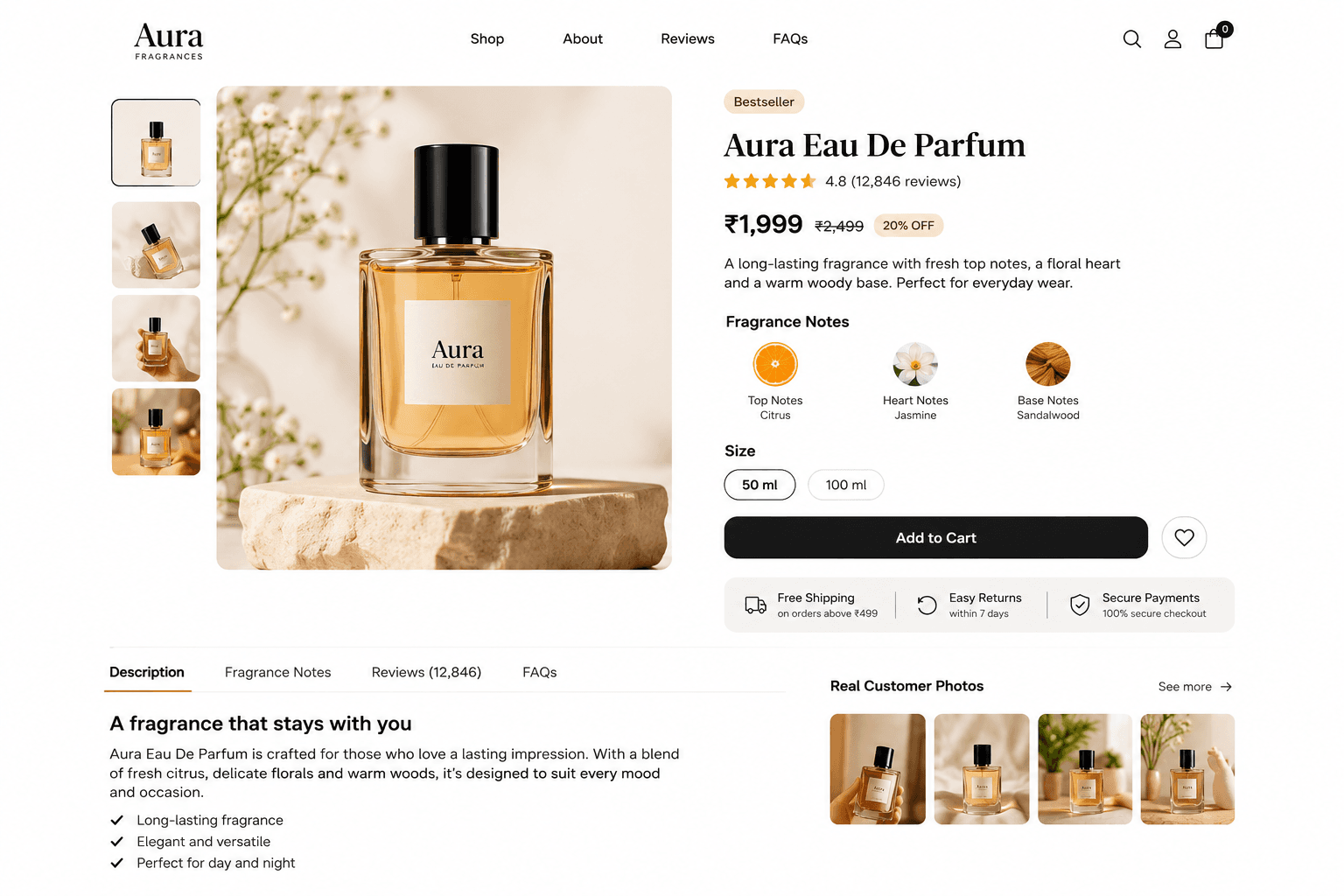
For example, consider a perfume brand. A product page that only displays the perfume bottle, price and a short description may not give shoppers enough information to decide whether they will like the fragrance.
The page can also explain its fragrance family, notes, scent profile, bottle size and recommended use. Customer reviews can provide additional context about their actual experience. These details help shoppers understand the product before purchasing.
How can you find the questions your customers are actually asking?
The best product-page questions often come from your existing customer conversations. Instead of writing generic FAQs, review the questions people already ask your sales and support teams.
Your customer support team might be answering the same questions every day. Those conversations can reveal what your product pages are failing to explain.
Look at these sources:
WhatsApp conversations before purchase.
Instagram DMs and comments.
Website chat enquiries.
Customer support emails and phone enquiries.
Product reviews and customer feedback.
Return and exchange reasons.
You can use the following process to turn those conversations into product-page improvements.
Collect recent customer questions. Start with the last 30 to 90 days of pre-purchase conversations as a practical starting point.
Group similar questions. Create categories such as sizing, quality, suitability, delivery, product usage and returns.
Identify repeated questions. Find the issues that customers ask about most frequently for each product or category.
Decide what evidence is needed. Some questions need a photograph, while others need a video, specification, comparison or policy summary.
Add the information to the product page. Place each answer near the relevant buying decision rather than hiding everything at the bottom.
Review the results. Monitor product-page conversion, support enquiries, returns and customer feedback after making the changes.
For example, if customers repeatedly ask whether a T-shirt is made from cotton, add the verified material composition and a close-up photograph of the fabric. If customers ask whether a product will reach their PIN code, consider adding a delivery availability checker.
The aim is to use actual customer questions to improve the shopping experience.
Where should you place important information on a Shopify product page?
Important product information should appear near the part of the page where customers need it. Do not make shoppers scroll through long descriptions or search through multiple pages to find basic answers.
Consider the following product-page structure.
Product-page section | What to include |
|---|---|
Product title and summary | Product name, key features and main benefit |
Product gallery | Multiple angles, close-ups and product-in-use photos |
Price and variants | Price, sizes, colours and available options |
Purchase section | Add to Cart button, stock information and delivery details |
Product description | Materials, ingredients, specifications and usage |
Customer reviews | Ratings, written feedback and customer-submitted images |
Shipping and returns | Delivery estimates, shipping charges and return conditions |
Product FAQs | Answers to repeated product-specific questions |
Information placement matters as much as the information itself.
For example, place a size guide beside the size selector rather than only mentioning it at the bottom of the description. Display delivery information near the purchase section. Show material and ingredient details near the product description.
Longer specifications and additional information can use expandable sections. However, avoid putting every important answer inside an accordion that customers might never open.
Are product photos enough to explain what customers are buying?
Product photos are important, but attractive images alone may not answer the questions customers have. Shoppers also need images and videos that show product details, actual size, texture and use.
Consider using a combination of:
Product photographs: Show the product from multiple angles and include close-up images of important details.
Product demonstration videos: Show how the product works or how customers should use it.
In-scale images: Show the product beside familiar objects or in its actual setting so shoppers can understand its size.
Customer photographs: Show genuine customer-submitted images that help shoppers understand what the product looks like outside a studio.
Comparison images: Explain differences between sizes, variants, materials or product models.
Baymard Institute's 2026 product-page UX research reports that 63% of the benchmarked ecommerce sites did not make it easy for shoppers to navigate between customer-submitted review images. Its research explains that shoppers use these images to check whether the product matches the store's photographs.
This is why genuine customer photographs can be useful alongside professional product photography. They provide another view of the product and help customers understand what other buyers actually received.
Do not replace product evidence with generic stock photographs or visuals that misrepresent the product. Use images and videos that accurately represent what the customer will receive.
How do you know whether your product page is improving?
Measure customer behaviour before and after making product-page changes. A page with more information is not automatically a better page unless customers can use that information and make more confident decisions.
Track these metrics:
Metric | What it helps you understand |
|---|---|
Product-page conversion rate | Are more product-page visitors completing purchases? |
Add-to-cart rate | Are more visitors showing interest in the product? |
Checkout reach rate | Are shoppers progressing towards checkout? |
Pre-purchase support enquiries | Are customers still asking basic product questions? |
Return and exchange rate | Are customers receiving products that match their expectations? |
Return reasons | Which product details or expectations may still be unclear? |
Shopify's guidance on writing engaging product descriptions recommends monitoring conversion rate, cart abandonment, return rate and support enquiries when evaluating product descriptions.
You can also test changes to product-page content and layout. For example, compare the existing product page with a version that includes better product photographs, clearer specifications and a visible delivery estimate.
Keep an eye on other metrics while testing. A drop in WhatsApp enquiries does not necessarily mean the product page has improved. Customers might simply be leaving without asking questions. Review enquiries alongside conversion and return data.
How should you improve your Shopify product pages?
Start with the products that receive the most traffic or sales. Review their customer questions, identify missing information and make improvements based on the evidence.
A practical way to begin is to select your best-selling products and review each page against the six buying objections covered in this guide. Check whether the page explains suitability, product details, performance, quality, delivery and post-purchase terms.
[ADD REAL EXAMPLE: Add a permission-approved before-and-after Shopify product-page example from a Brave Banana project. Include the original customer objections, the missing product information, the changes made to the page and any measured results. Do not include a conversion or sales improvement unless supported by analytics.]
If you want to improve more than individual product pages, review how the homepage, collection pages, navigation and checkout support the same buying journey. [INTERNAL LINK: Shopify store design and conversion optimisation]
Brave Banana builds, redesigns and improves Shopify stores for Indian D2C brands. If your customers repeatedly ask questions that your product pages should answer, the first step is to identify those questions and plan the right information around them.
Sources
Writing engaging product descriptions - Shopify Help Center
UX Guidelines for Ecommerce Product Pages - Nielsen Norman Group
Product Page UX 2026: 10 Pitfalls and Best Practices - Baymard Institute
Product Page UX Research - Baymard Institute
Questions
Does adding more information to a Shopify product page improve conversions?
More information can help when it answers genuine customer questions and makes the buying decision easier. Adding long descriptions or unrelated FAQs can make a page harder to use. Focus on the details customers need, place them near the relevant buying decision and measure conversion, support enquiries and returns.
Should every Shopify product page have an FAQ section?
No. A product page does not need a long FAQ section if its main questions are already answered clearly in the product details. Use product-specific FAQs when customers repeatedly ask questions that do not fit naturally into the main description, specifications or shipping information.
Should customer reviews appear above or below the product description?
The best placement depends on the product and how customers shop. Keep important purchase information easy to find, and make customer reviews accessible near the product details and purchase decision. For products where trust and real-world experience matter, customer photographs and relevant reviews can be especially useful.
What is the difference between a product description and a product page?
A product description is the written content explaining a product's features, benefits and details. A product page is the complete page containing the description, product images, price, variants, reviews, delivery information and purchase options. Both should work together to help customers make an informed decision.
Want help with your Shopify store?
Brave Banana builds and fixes Shopify stores for Indian brands. Send us a message on WhatsApp and tell us what you are working on.
Opens WhatsApp with a short message you can edit before sending.